How to Buy BGMI UC – Introduction
If you play Battlegrounds Mobile India (BGMI), you’ve probably heard about BGMI UC (Unknown Cash)—the premium in-game currency of BGMI. How to buy BGMI UC can be pretty interesting. It unlocks exclusive outfits, weapon skins, Royale Pass, and more. UC is essential for players who want to enhance their gaming experience and stand out in matches.
In this complete guide, you will learn how to buy BGMI UC safely, cheaply, and correctly in 2026, including tips, pricing, payment methods, and common mistakes to avoid. Whether you are a beginner or an experienced player, this article covers everything in detail.
How to Buy BGMI UC – What is BGMI UC?
UC (Unknown Cash) is the premium currency used in BGMI. Players purchase UC with real money and then use it to buy in-game items such as:
- Royale Pass (Elite & Elite Plus)
- Weapon skins
- Character outfits
- Emotes and accessories
- Crates and lucky spins
UC allows players to access premium content unavailable to free users.
How to Buy BGMI UC – Why You Should Buy UC in BGMI
Buying UC offers several advantages:
1. Unlock Premium Rewards
UC helps you unlock the Royale Pass, which offers exclusive rewards by completing missions.
2. Better Customisation
You can purchase:
- Gun skins
- Vehicle skins
- Outfits and emotes
3. Access to Exclusive Events
Many limited-time events require UC’s participation.
4. Competitive Edge (Cosmetic)
While UC doesn’t directly increase skill, it improves your in-game presence and experience.
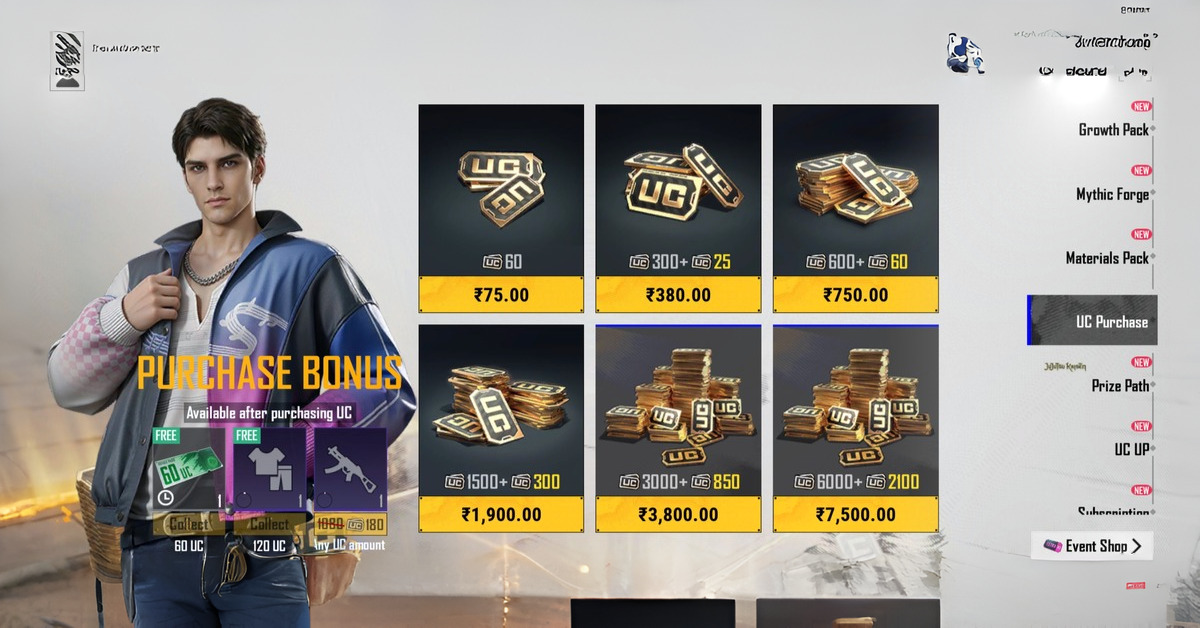
How to Buy BGMI UC – BGMI UC Price List (India)
Here’s a general idea of UC pricing in India:
| UC Amount | Price (INR) |
|---|---|
| 60 UC | ₹60–₹75 |
| 300 UC | ₹300–₹380 |
| 600 UC | ₹750 |
| 1500 UC | ₹1,900 |
| 3000 UC | ₹3,800 |
| 6000 UC | ₹7,500 |
Prices may vary slightly depending on the platform and offers.
How to Buy BGMI UC – Methods to Buy BGMI UC
There are three main ways to buy UC safely.
1. Buy UC Directly In-Game (Official Method)
This is the safest and easiest method, especially for beginners.
Steps:
- Open BGMI
- Go to the lobby
- Tap on the UC icon (+ button)
- Select your desired UC pack
- Choose payment method
- Complete the payment
Once done, UC is instantly added to your account.
Payment Methods Available:
- UPI (PhonePe, Google Pay, Paytm)
- Debit/Credit Card
- Net Banking
- Google Play Balance
2. Buy UC Using UniPin (Best Value)
UniPin is an official partner platform for BGMI UC purchases.
Steps:
- Visit the UniPin website
- Select BGMI
- Enter your Player ID
- Choose the UC pack
- Pay using UPI, wallet, or card
Benefits:
- Bonus UC offers
- Discounts during events
- Quick delivery (within minutes)
Example:
- 1500 UC + 450 bonus (₹1499)
3. Buy UC Using Redeem Codes
You can also use Google Play redeem codes.
Steps:
- Buy a Google Play gift card
- Redeem code in the Play Store
- Open BGMI
- Use balance to buy UC
This method is useful if:
- You don’t have a bank account
- You want to control spending
How to Buy BGMI UC – Best Time to Buy UC
Timing matters if you want maximum value.
1. UC Up Events
These events give extra UC on purchase.
2. Seasonal Offers
During festivals or updates, BGMI offers bonuses.
3. Royale Pass Launch
Buying UC during the new season launch gives better rewards.
How to Buy BGMI UC – What to Buy with UC (Smart Spending Guide)
Instead of wasting UC, use it wisely:
1. Royale Pass (Best Investment)
- Costs around 360 UC
- Gives rewards worth much more
2. Premium Crates
- Chance to win rare skins
- Best during increased drop-rate events
3. Limited-Time Skins
- Rare and exclusive items
How to Buy BGMI UC – Safety Tips While Buying UC
Buying UC can be risky if done incorrectly. Follow these rules:
✅ Use Only Official Methods
- In-game purchase
- Trusted partners like UniPin
❌ Avoid Fake Websites
Many sites promise:
- Free UC
- Cheap UC
These are scams and can:
- Hack your account
- Steal money
❌ Never Share Account Details
No official service will ask for:
- Password
- OTP
- Email access
How to Buy BGMI UC – Common Mistakes to Avoid
1. Buying from Unauthorised Sellers
Cheap deals = high risk.
2. Ignoring Offers
Always check for bonus UC events.
3. Overspending
Set a budget before purchasing.
4. Not Checking Player ID
Wrong ID = UC goes to another account.
How to Buy BGMI UC – Troubleshooting UC Purchase Issues
If UC is not received:
Try These Steps:
- Restart the game
- Check payment status
- Wait a few minutes
If still not resolved:
- Contact BGMI support
Pro Tips to Save Money on UC
- Buy during bonus events
- Use wallet cashback offers
- Choose bulk packs for better value
- Avoid small, frequent purchases
FAQs
Q1: Is buying UC legal?
Yes, if done through official platforms.
Q2: Can I get UC for free?
No legitimate method exists. Avoid scams.
Q3: How fast is UC credited?
Usually instantly or within a few minutes.
Q4: Can I transfer UC to another account?
No, UC cannot be transferred.
Conclusion
Buying UC in Battlegrounds Mobile India is simple if you follow the correct methods. The safest way is always through the in-game store or official partners like UniPin. While UC enhances your gaming experience, it’s important to spend wisely and avoid scams.
By following this guide, you can:
- Buy UC safely
- Get the best value for money
- Avoid common mistakes
If you’re serious about BGMI, investing in UC—especially for the Royale Pass—is one of the best decisions you can make.
iOS Download link:- https://apps.apple.com/in/app/battlegrounds-mobile-india/id1526436837
Android Download link:- https://play.google.com/store/apps/details?id=com.pubg.imobile&hl=en_IN